Every five minutes, a piece of deadpan, real-sounding personal drama, under your name. Read the disclaimer first.
Free WoW Addon · Available Now · 168 KB
Version 3.3Retail · MidnightFreeUse at your own risk
Drama Queen posts a piece of deadpan, real-sounding personal drama to guild chat under your name, acts it out as an emote (stares at their phone. "I think I'm pregnant.") and says it out loud in /say. No lizard jokes, no game jokes: pregnancy scares, arrests, a second phone found in the car, eviction notices. It reads like news. That is the point, and also the problem.
Use at your own risk. Read the disclaimer before you install it.
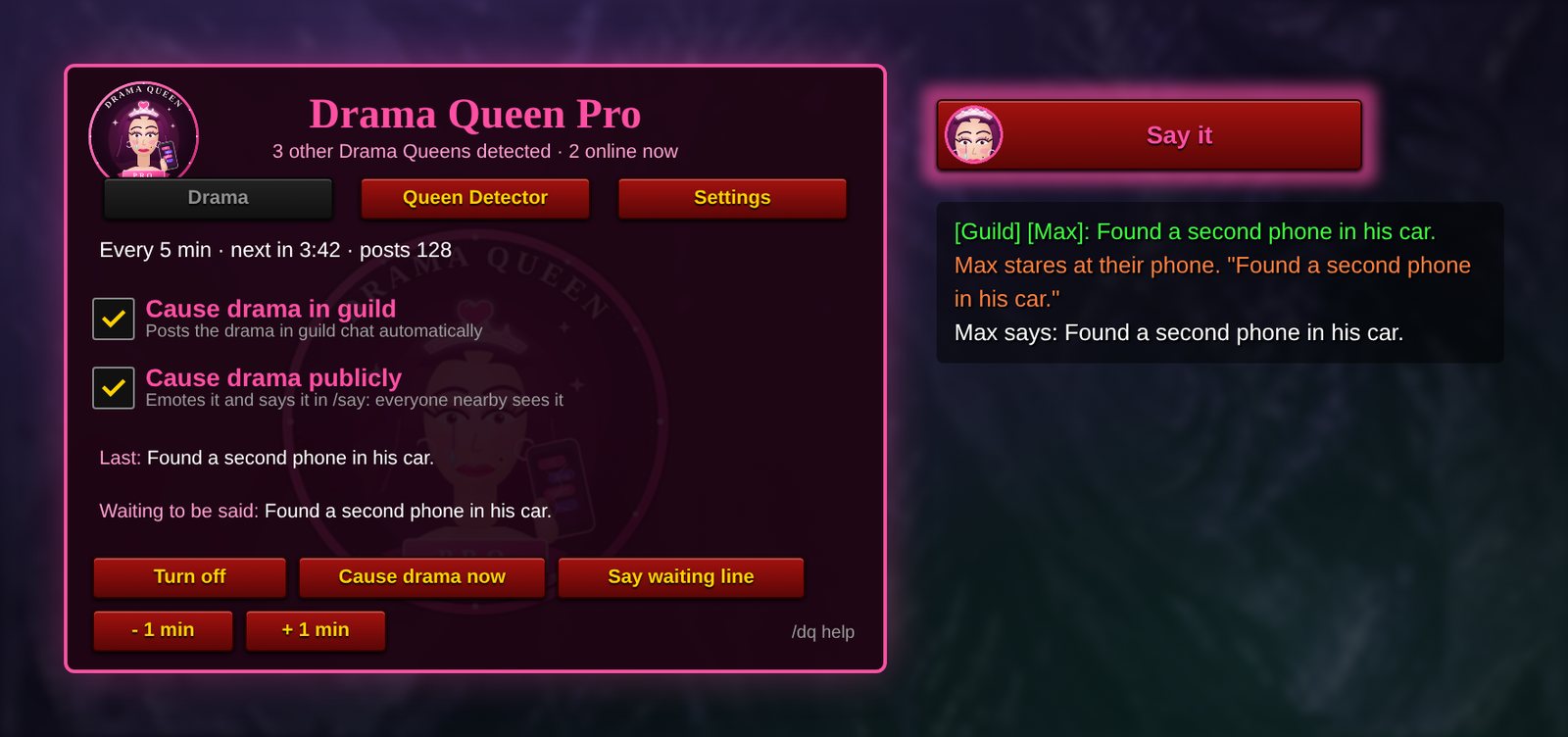
Panel preview, recreated from the addon's code. In game it uses your own character, target and guild.
WHAT IT DOES
New in 3.3
Two simple switches
Cause drama in guild posts the drama in guild chat, and Cause drama publicly emotes it and says it in /say for everyone nearby. Tick either, both or neither.
The Drama
6,000 updates and running storylines
6,000 one-off updates that never repeat until every one has been used, plus storylines that play out over consecutive posts: the pregnancy test, the second phone, the eviction, "Kevin Gym". It never names real people, never asks anyone for gold, money or help, and leaves out self-harm, suicide and abuse.
The Queen Detector
See who else is running it
Every copy quietly checks in, so a panel shows who else runs Drama Queen Pro and how many of you there are, in your guild, your group or anywhere on the Drama Queen network. You get a notice when a new queen appears.
The Queen Herself
Logo, Say button and Full Support
The tearful Queen sits on the panel and on the glowing Say it button. Pairs with Full Support, so guildmates can answer your drama with heartfelt support automatically. Only one copy per guild posts, and it pauses in combat and boss chat lockdowns.
COMMANDS
Command
What it does
/dq or /drama
Show or hide the Drama Queen panel
/dq queens
Open the Queen Detector: who else is running Drama Queen Pro, where, which version and how many posts
/dq scan
Look for other Drama Queens right now (they also check in every 2 minutes)
/dq network
Join or leave the Drama Queen network, which finds queens outside your guild and group
/dq now
Post one piece of drama right now
/dq say
Say the waiting line in /say (or click the glowing "Say it" button, or bind a key under Key Bindings > AddOns)
/dq guild
Cause drama in guild: on or off
/dq public
Cause drama publicly (emote and /say): on or off
/dq emote · saymode
Fine-tune public drama: emote only, or /say only
/dq on · off
Start or stop the automatic posts
/dq every 10
Minutes between posts (1 to 60, default 5)
/dq main
Make this character the one that posts, if several copies are running
/dq status
Show the timer, post count and which character is posting
Drama Queen Pro 3.1 and Full Support
Disclaimer: Use at Your Own Risk
Drama Queen is a prank addon. It automatically posts fictional personal drama to guild chat, under your character's name, on a timer, with nothing to tell readers it is fake. By downloading, installing or running it, you accept everything below. If any of it gives you pause, do not use it.
1. People will believe it
The posts are written to read like real news from you: pregnancy, arrests, cheating, eviction, court dates, family fallouts. Guildmates may take them at face value.
Expect worried whispers, sincere advice, offers of help, awkward questions in voice chat and, possibly, people who feel hurt or misled when they learn it was a bit.
Some of your guildmates may be living through exactly these situations. A joke for you can land as something painful for them.
Whatever happens to your friendships, reputation, guild standing or relationships because of these posts is your responsibility, not the author's.
2. Ask before you post
We strongly recommend getting your guild leader's and officers' permission first, and telling your guild that Drama Queen is running.
Do not run it in a guild that has not agreed to automated posts. Repeated automated messages in a guild that does not want them can be treated as spam.
If someone asks whether you are okay, tell them the truth. Never use the posts to get sympathy, gifts, gold, money, carries or favors. Asking for anything on the strength of a fake crisis is a scam, and it is not what this addon is for.
3. Your account, your risk
Players can report chat they find disruptive, misleading or spammy. Reports can lead to chat silences or other account action under Blizzard's rules. You alone are responsible for how you use this addon and for any action taken against your account.
Drama Queen is a fan-made addon. It is not made, endorsed or supported by Blizzard Entertainment.
It is provided as is, with no warranty of any kind. Game patches can change or break chat behavior at any time.
3b. The Queen Detector shares that you run it
Every copy of Drama Queen Pro announces itself, with your character name, version and post count, to other copies in your guild, your group and the Drama Queen network. Anyone running it can see that you run it too.
The network is a chat channel called DramaQueenNet. It only carries hidden addon messages and is kept out of your chat windows, but it does use one of your channel slots. Turn it off in the Settings tab or with /dq network if you would rather stay hidden.
4. Keep it fictional
Do not edit the addon to name real players, real people or real places, to reveal anyone's private information, or to target anyone. That turns a prank into harassment.
Do not add lines about self-harm, suicide, abuse or violence. People rightly treat those as emergencies.
Version 2.5 also posts in /emote and /say, which everyone near you can see, including strangers and players outside your guild. Untick Cause drama publicly (or type /dq public) in busy cities, in groups with people you don't know, and anywhere you would not want an audience.
Public /say and /emote drama is far more likely to be reported than guild chat. Never aim it at strangers, and stop at once if anyone nearby objects.
5. When to switch it off
If anyone in your guild is upset, worried or asks you to stop, type /dq off and explain. Letting go is the first virtue of the Coil.
Turn it off during serious guild moments, real announcements, memorials, or when a guildmate is going through something real.
If you or someone in your guild is dealing with any of these situations for real, please talk to someone you trust or a local support service. A WoW addon is not the place for that, and real problems deserve real help.
Extract the zip. Move the DramaQueen folder into World of Warcraft\_retail_\Interface\AddOns\. On Windows this is usually C:\Program Files (x86)\World of Warcraft\_retail_\Interface\AddOns.
Make sure the folder sits directly inside AddOns, not in a folder inside a folder.
Fully restart the game. You should see "Drama Queen Pro 3.3 loaded" in your chat window.
Type /dq, read the switches, and tell your guild it is running.
Steam Deck faithful: the AddOns folder is inside the Proton/Wine prefix where Battle.net is installed, under the same World of Warcraft/_retail_/Interface/AddOns path. Switch to Desktop Mode and move the folder there.
QUESTIONS
How often does it post?
Every five minutes by default. Change it from 1 to 60 minutes with /dq every 10.
Can I hide from the Queen Detector?
Leave the Drama Queen network in the Settings tab or with /dq network. Copies in your guild and group can still see that you run it.