Downloads

World of Warcraft Addons

The sacred relics of the Coil. Download, install, and perform the rites of Xal'Reth.

WHAT IT DOES

The Rites

10,100 rites of Xal'Reth

The 100 Canon Rites are hand-written across 10 categories, 1,000 emotes in all. The Grand Book holds 10,000 more numbered rites in 200 categories: ten Orders (Gathering, Devotion, Hymnody, the Scale, Passage, Battle, Offering, Divination, Lore, Fellowship), each with twenty Aspects such as Dawnlit, Frostbound, Moonsworn and Star-Crowned.

Every rite number is the same on every computer, so the faithful can agree: "Tonight we perform #4817."

The Panel

Xal'Reth, in glory

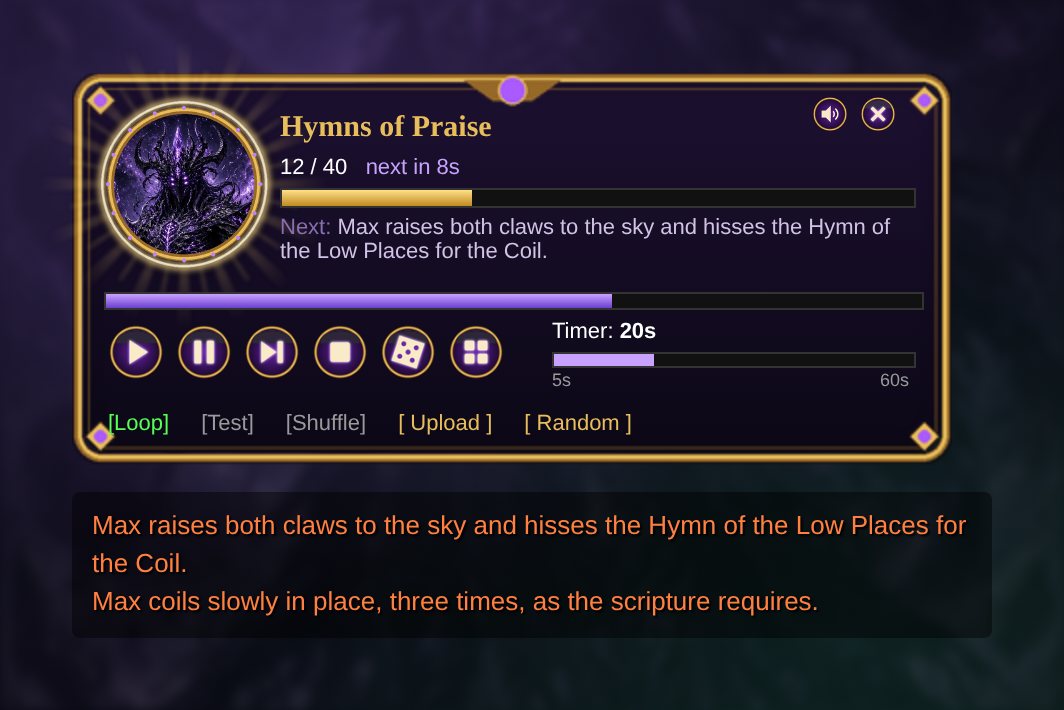
Xal'Reth sits within a rotating sigil. With every emote he erupts in light: a halo, turning rays, shockwave rings, sparkles, and a flaring border, with a soft synth pad behind it. Every fifteen seconds he slowly transforms into his dragon form and back.

Play, pause, next and stop; a 5 to 60 second timer slider; dice for random timing; loop, shuffle, and test modes.

The Book

Browse and search every rite

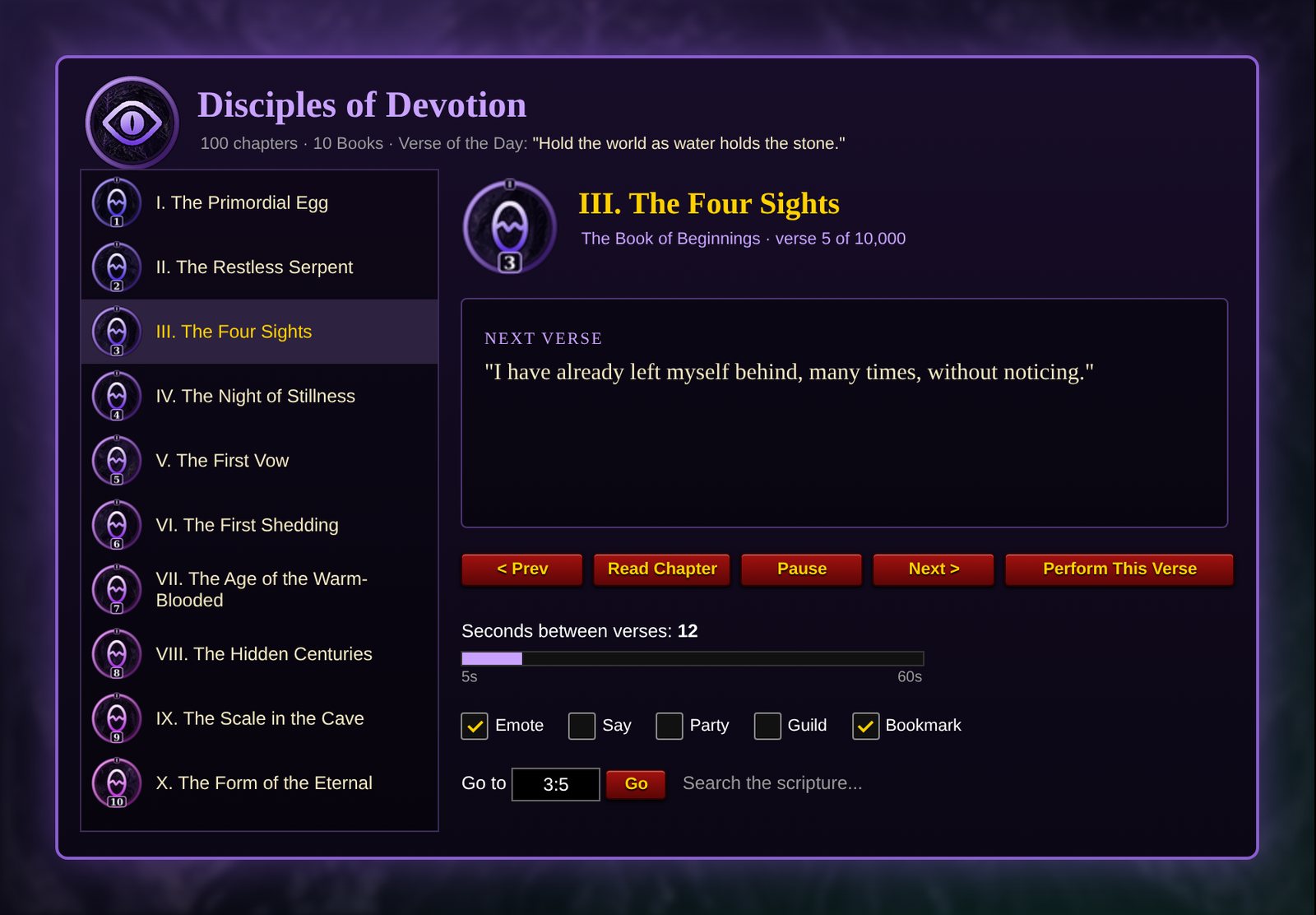
Open the Book of Xal'Reth to browse by Order and Aspect, or search by number (4817), canon number (c12), or words. Every rite has its own icon built from its Order's colors and its Aspect's rim and gem. Left-click to choose, right-click to begin at once.

Your Own Rites

Upload your own

Name a rite, paste in your emotes one per line, and save it. Xal'Reth RP tidies them up for you: it strips "/e" and numbering, splits lines that are too long for chat, and fills in {target} with your target's name.

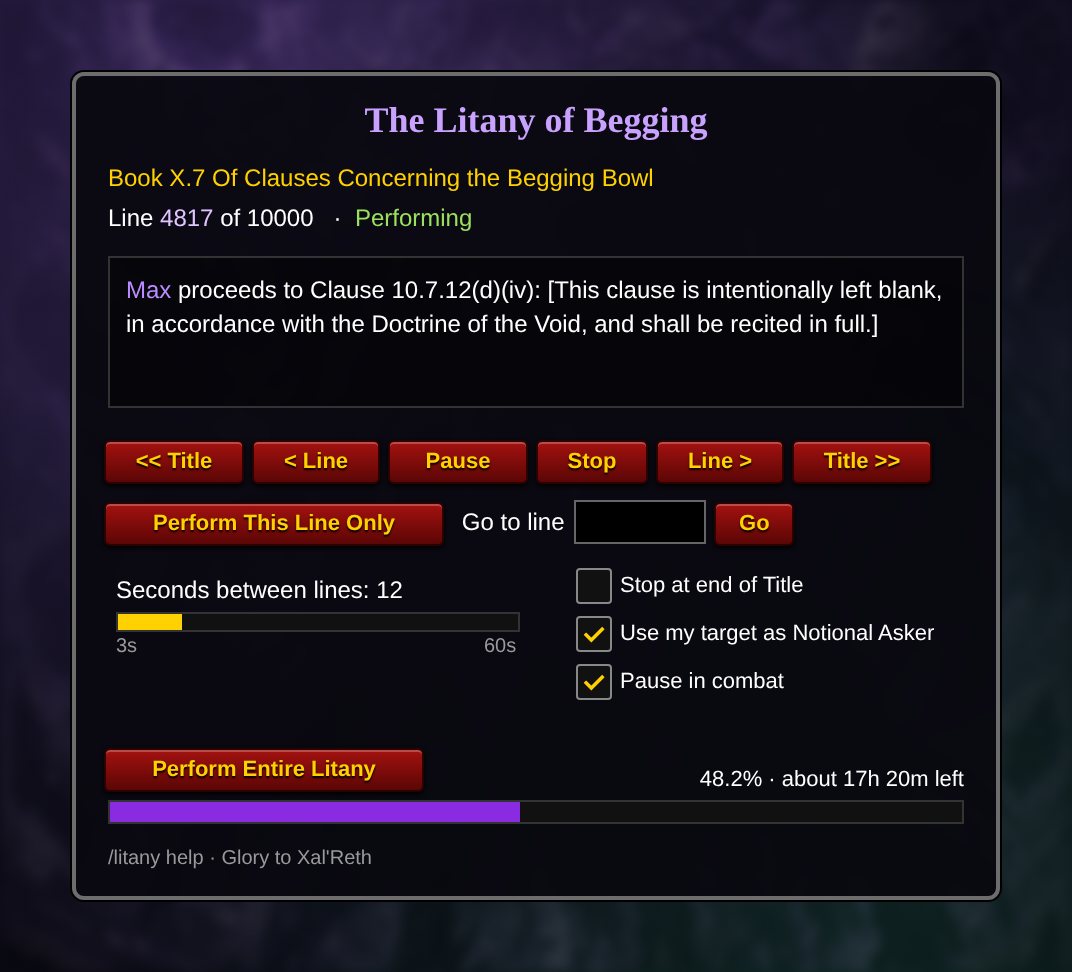
Rites pause automatically in combat and resume on the same line afterward.

COMMANDS
CommandWhat it does
/xrpShow or hide the Xal'Reth panel
/xrp bookOpen the Book of Xal'Reth
/xrp start 4817Begin rite #4817 from the Grand Book (or c12 for a Canon Rite)
/xrp random startBegin a random rite
/xrp pause · resume · next · stopControl the current rite
/xrp interval 20Set the seconds between emotes (5 to 60)
/xrp diceRandom timing between emotes
/xrp uploadPaste in your own emotes and save them as a rite
/xrp search <words>Search the Book
/xrp sound · morphToggle the synth pad or the dragon transformation
/xrp helpList every command

You can also open the panel from the addon compartment button on your minimap.

STORYCASTER COMMANDS
CommandWhat it does
/storyShow the StoryCaster panel (also /storycaster)
/story writeThe Write a Script window: paste your roleplay (or a shared script) and it becomes lines
/story linesEdit the chosen script line by line: start from a line, test, move or delete it
/story start [name] · pause · resume · stopControl the performance
/story deliverPost the next line now; /say and /yell lines wait for it (bind a key to it)
/story jump 2Jump to a scene (## Act Two lines start scenes); /story jump lists them
/story share nameCopy a script as text for a friend or Discord
/story ambientA quiet loop of small idle actions for standing RP
/story loreOpen the panel's Lore Library tab: dropdowns for class, faction and race, each with Perform, Preview and Edit
/story lore blood elfPerform the lore for a class, race or faction straight away
/story manual · paceEvery line waits for Deliver, or the wait grows with each line's length
/story interval 20 · dice 15 25Seconds between lines, or random timing and its range
/story loop · shuffle · testRepeat, mix the order, or rehearse privately
/story compactFold the panel down to its play controls
/story duetJoin duet invitations automatically instead of asking
/story anim bow · animsPlay an animation, or list all of them
/story mood angry · mood noneSet the mood every <mood> in your lines takes (happy, sad, angry, scared, calm, excited, nervous, tired, playful, serious)
/story emotesEvery emote in the game, with search, one click each
/story randomA random emote, at most once every 15 seconds
/story drama · drama on · drama nowThe Drama slide-out; drama on a timer in guild chat or out loud (off until you turn it on)
/story paranoid · rotBecome suspicious of your target in five acts, or one line of brain rot
/story reactions · send Name · voiceAnswers to emotes aimed at you, send the chosen script to a friend, your title, catchphrase and mood words
/story focus Name · focus target · focus offPlayer Focus: weave another player into your scenes now and then (focus light or more)
/story profile · promptOpeners from your target's RP profile, or random scene prompts (the Ideas tab)
/story backup · minimap · sparklesBack up or restore every script, show or hide the minimap button, turn the sparkles on or off
/story pirate · pirate accentThe Pirate panel, or turn the pirate accent on and off
/story status fishing by the lake25 lines for what you're doing; /story status alone says one now
/story choose 1Pick a path at a ?? line (or click it on the panel)

The easy way: install it with the CurseForge app (Midnight or Forever). Or install it like the others: move the StoryCaster folder into Interface\AddOns for Midnight (_retail_) or Forever (_forever_).

NO HABLO COMMANDS
CommandWhat it does
/nhShow or hide the No Hablo button (also /nohablo)
/nh on · offTurn the filter on or off (the red button does the same)
/nh speakersMute the whole speaker for the session, or hide only their Spanish lines
/nh listWho is muted right now, and how many of their lines were hidden
/nh allow NameLet one muted player back into your chat
/nh test some wordsCheck whether a line would be hidden

Install it like the others: move the NoHablo folder into Interface\AddOns for Midnight (_retail_) or Forever (_forever_).

PARANOID RP COMMANDS
CommandWhat it does
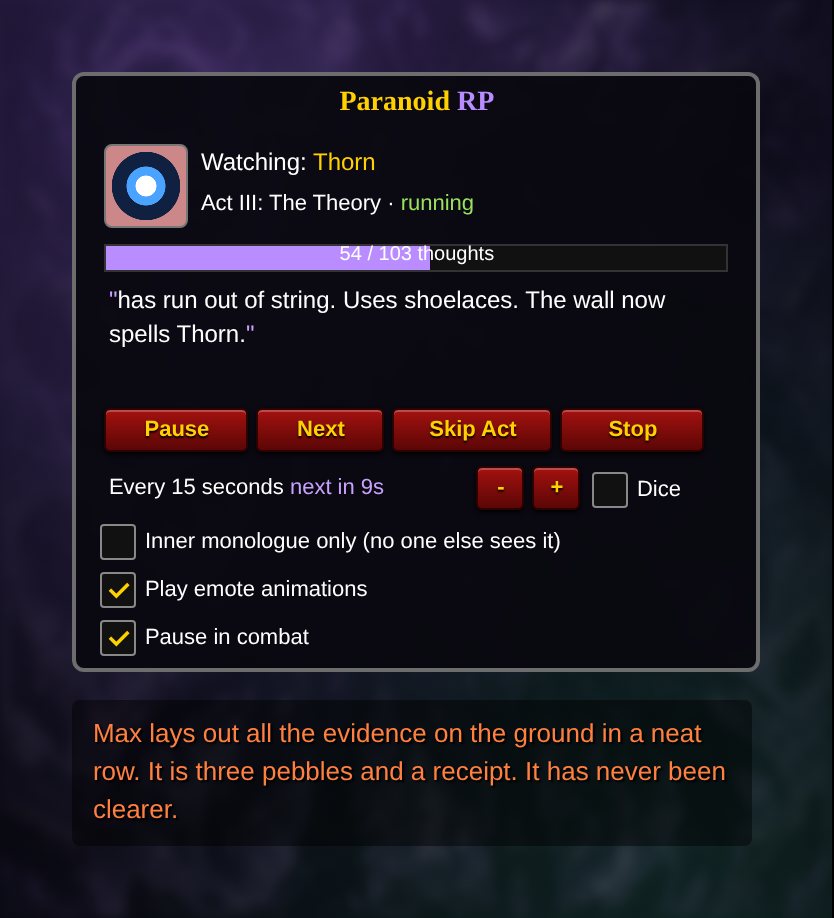
/paraShow or hide the Paranoid RP panel
/para startStart watching your target (/para start 3 begins at Act III)
/para pause · next · skip · stopPause, say the next thought now, jump to the next act, or stop
/para interval 15Seconds between thoughts (5 to 60)
/para diceRandom timing between thoughts
/para quietInner monologue: thoughts shown only to you
/para animTurn emote animations on or off

Install it like the others: extract the zip and move the ParanoidRP folder into World of Warcraft\_retail_\Interface\AddOns\, then restart or /reload.

Brain Rotter Pro commands

CommandWhat it does
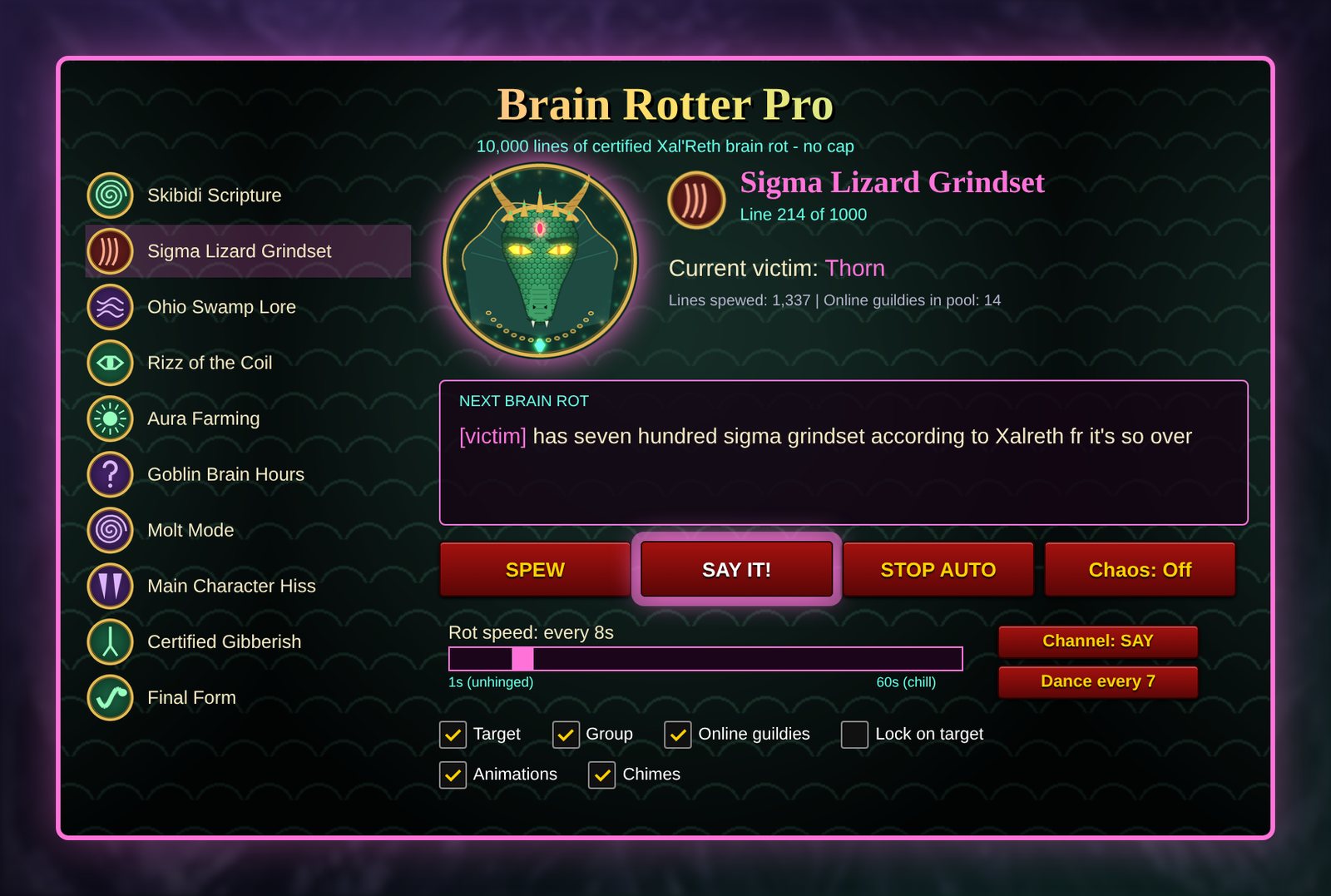
/rot or /brainrotShow or hide the Brain Rotter Pro panel
/rot spewSpew one line of brain rot right now
/rot say or the SAY buttonSay the next line out loud in /say (bind a key under Key Bindings > AddOns)
/rot autoStart or stop auto-rot (emote, party, raid, guild, or say with the SAY button)
/rot stopStop auto-rot
Key Bindings > AddOnsBind Spew, Auto-rot and the panel to keys

Install it like the others: extract the zip and move the BrainRotterPro folder into World of Warcraft\_retail_\Interface\AddOns\, then restart or /reload. Please rot responsibly: aim it at willing guildmates, not strangers.

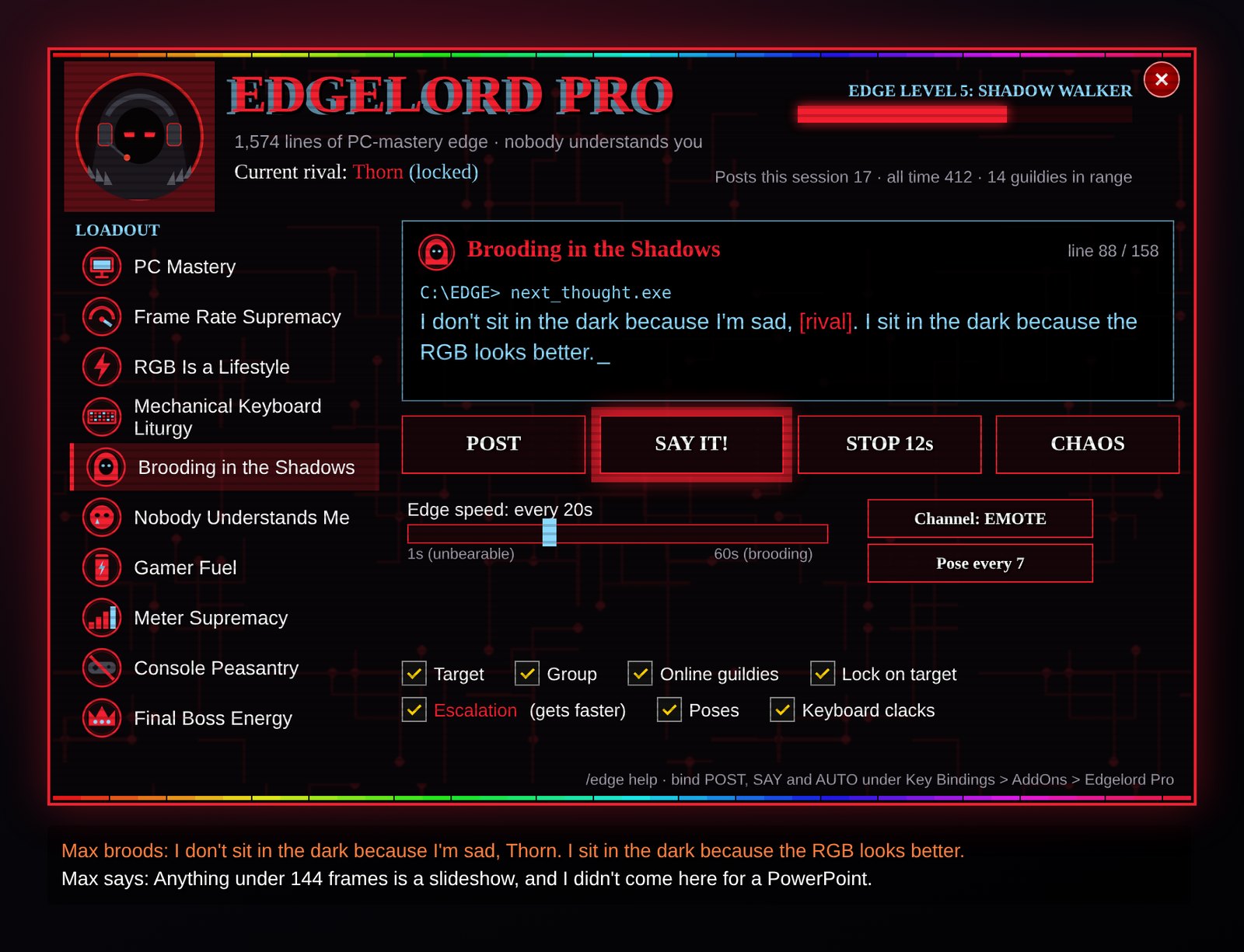
Edgelord Pro commands

CommandWhat it does
/edge or /edgelordShow or hide the Edgelord Pro panel
/edge nowPost one edgy line right now
/edge say or the SAY buttonSay the next line out loud in /say (bind a key under Key Bindings > AddOns)
/edge autoStart or stop auto-edge (emote, party, raid, guild, or say with the SAY button)
/edge stopStop auto-edge
/edge escalateEscalation on or off: each auto line comes a second sooner, down to the channel minimum
/edge chaosChaos Mode on or off: a random category every line
Key Bindings > AddOnsBind Edge, Say, Auto-edge and the panel to keys

Install it like the others: extract the zip and move the EdgelordPro folder into World of Warcraft\_retail_\Interface\AddOns\, then fully restart the game. Please edge responsibly: aim it at willing guildmates, and switch it off when someone asks.

Master Baiter Pro commands

CommandWhat it does
/mbpShow or hide the Master Baiter Pro panel (also /baiter)
/mbp start · stopBegin or end a fishing session (casting Fishing also begins one)
/mbp key FChoose your one key (default F). It only changes while a session runs
/mbp sound on · offLoud splash mode: sound effects up, music and ambience off while you fish
/mbp soft on · offLet your key reach the bobber through soft interact
/mbp autoloot on · offTurn on auto loot while you fish
/mbp idle 3End the session after this many idle minutes (0 = never)
/mbp scan on · offPrice your fish automatically when you open the auction house (on by default)
/mbp pricesList the auction price of everything you have caught
/mbp toasts on · offThe pop-up card for every catch
/mbp glow on · offThe moving lights: the aura, the spark round the rim, bubbles, twinkles, sheens and coin bursts (on by default)
/mbp jackpot 100The gold value that counts as a jackpot catch
/mbp boardOpen the leaderboard: everyone running Master Baiter Pro, who is online, their fish and their best catch
/mbp network on · offJoin or leave the leaderboard network (on by default)
/mbp exportCopy your records and the leaderboard, for a leaderboard website such as the Anglers of the Coil
/mbp records · ach · lastPersonal records, achievements, the last summary card
/mbp reset confirmWipe your records and start fresh
/mbp debugCheck why your key is not reaching the bobber

Bind Begin or end a fishing session under Key Bindings > AddOns > Master Baiter Pro if you like. Install it like the others: move the MasterBaiterPro folder into World of Warcraft\_retail_\Interface\AddOns\ and restart the game. If you had Coil Angler, delete its CoilAngler folder: Master Baiter Pro replaces it.

Master Bait Forever commands

CommandWhat it does
/mbfShow or hide the Master Bait Forever panel (also /baitforever)
/mbf start · stopBegin or end a fishing session (casting Fishing also begins one)
/mbf key FChoose your one key (default F)
/mbf sound · soft · autoloot on · offLoud splash mode, soft interact and auto loot while you fish
/mbf scan on · offPrice your fish automatically at the auction house
/mbf pricesList the price of everything you have caught
/mbf jackpot 5The gold value that counts as a jackpot catch
/mbf boardOpen the leaderboard of Forever anglers
/mbf network on · offJoin or leave the leaderboard network
/mbf records · ach · lastRecords, achievements, the last summary card
/mbf debugCheck why your key is not reaching the bobber
/mbf glow on · offThe moving lights: the aura, the spark round the rim, bubbles, twinkles, sheens and coin bursts (on by default)

For World of Warcraft: Forever. Move the MasterBaitForever folder into World of Warcraft\_forever_\Interface\AddOns\ and restart the game.

Vyrenna RP commands

CommandWhat it does
/vrp or /vyrennaShow or hide the Vyrenna panel
/vrp bookOpen the Teachings: books, chapters and every verse
/vrp start 1.4Read Book I, chapter 4 (I.4 works too; book 0 is the Preface)
/vrp start 1.4.2Read a single verse
/vrp start b3Read a whole book (here the Book of Nhalor)
/vrp start bookRead the whole Teachings, all 509 verses
/vrp random startLet Vyrenna choose a chapter
/vrp pause · resume · next · stopControl the reading
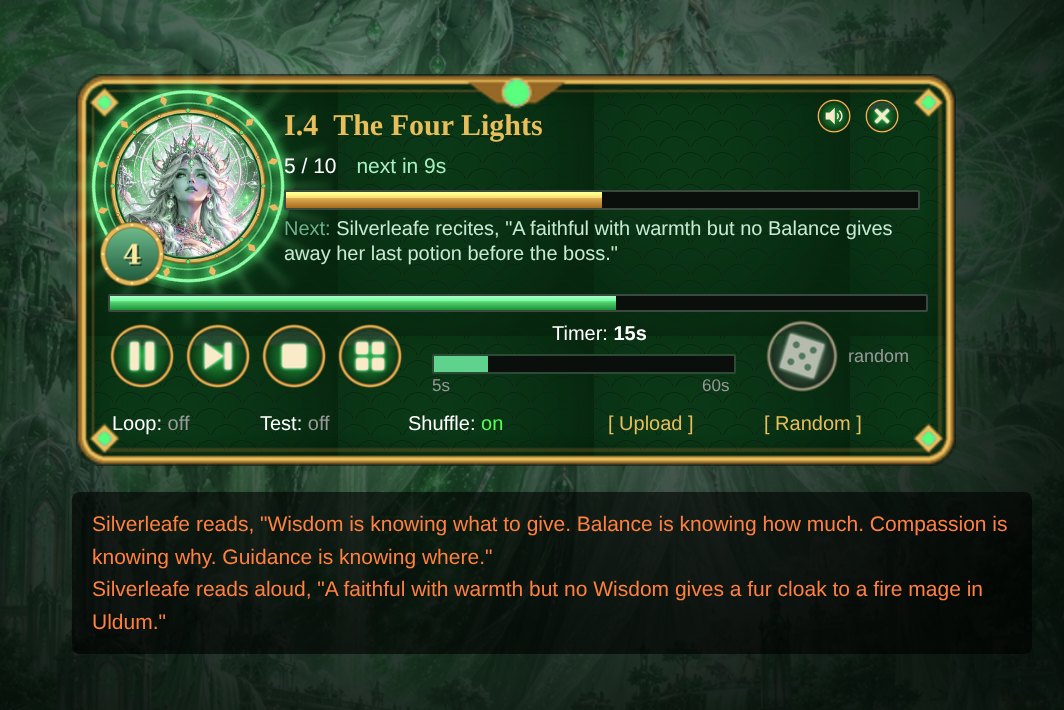
/vrp interval 15 · diceSeconds between emotes (5 to 60) · random timing
/vrp search liliesFind every verse that mentions something
/vrp uploadPaste in your own emotes and save them as a reading
/vrp sound · morphToggle the synth pad or the radiant form
/vrp helpList every command

Install it like the others: extract the zip and move the VyrennaRP folder into World of Warcraft\_retail_\Interface\AddOns\, then fully restart the game so the art loads.

Drama Queen Pro commands

CommandWhat it does
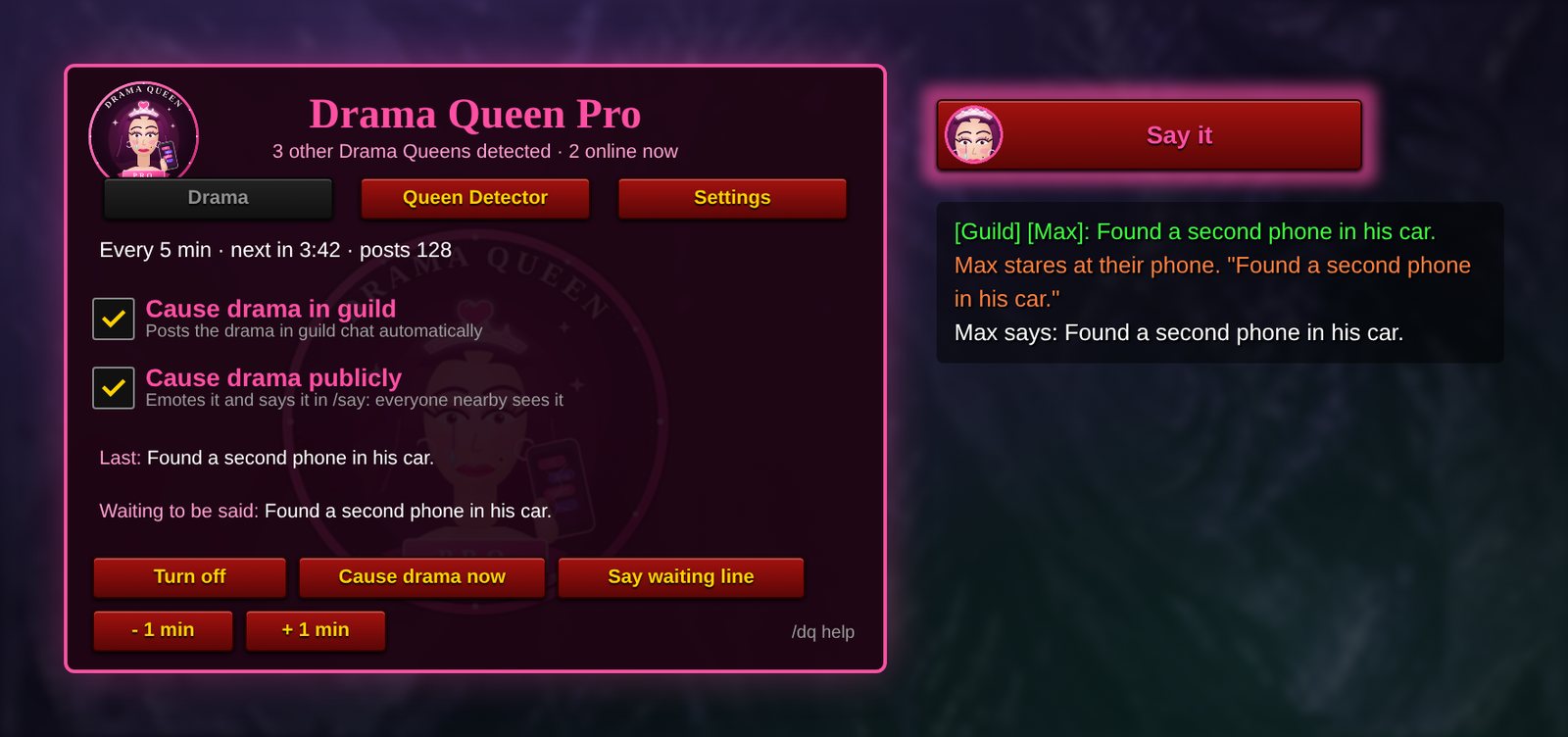
/dq or /dramaShow or hide the Drama Queen panel
/dq queensOpen the Queen Detector: who else is running Drama Queen Pro, where, which version and how many posts
/dq scanLook for other Drama Queens right now (they also check in every 2 minutes)
/dq networkJoin or leave the Drama Queen network, which finds queens outside your guild and group
/dq nowPost one piece of drama right now
/dq saySay the waiting line in /say (or click the glowing "Say it" button, or bind a key under Key Bindings > AddOns)
/dq guildCause drama in guild: on or off
/dq publicCause drama publicly (emote and /say): on or off
/dq emote · saymodeFine-tune public drama: emote only, or /say only
/dq on · offStart or stop the automatic posts
/dq every 10Minutes between posts (1 to 60, default 5)
/dq mainMake this character the one that posts, if several copies are running
/dq statusShow the timer, post count and which character is posting

Install it like the others: extract the zip and move the DramaQueen folder into World of Warcraft\_retail_\Interface\AddOns\, then fully restart the game. You should see "Drama Queen Pro 3.3 loaded" in your chat window.

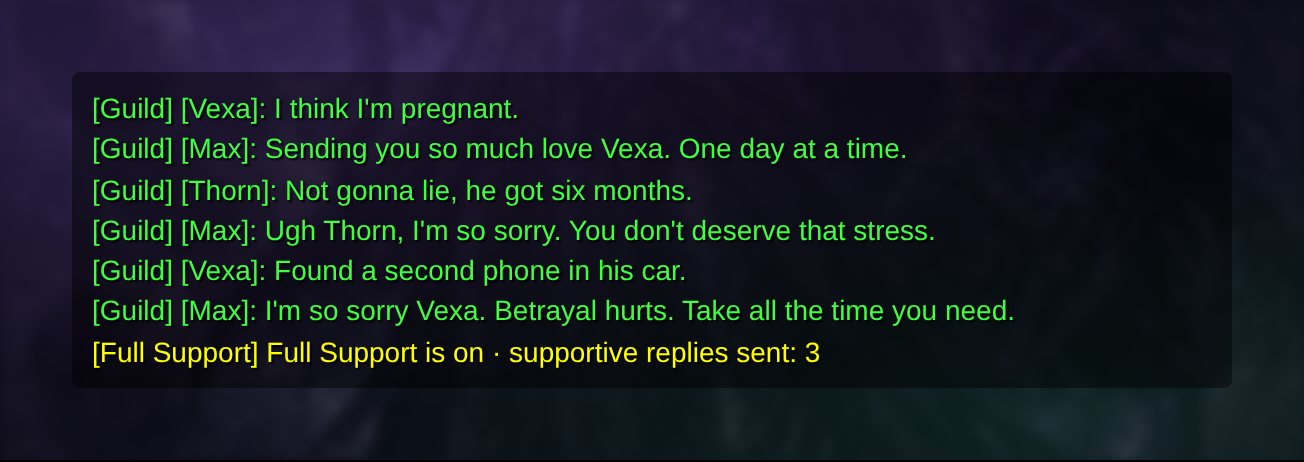
Drama Queen Pro 3.1 and Full Support

Disclaimer: Use at Your Own Risk

Drama Queen is a prank addon. It automatically posts fictional personal drama to guild chat, under your character's name, on a timer, with nothing to tell readers it is fake. By downloading, installing or running it, you accept everything below. If any of it gives you pause, do not use it.

1. People will believe it

  • The posts are written to read like real news from you: pregnancy, arrests, cheating, eviction, court dates, family fallouts. Guildmates may take them at face value.
  • Expect worried whispers, sincere advice, offers of help, awkward questions in voice chat and, possibly, people who feel hurt or misled when they learn it was a bit.
  • Some of your guildmates may be living through exactly these situations. A joke for you can land as something painful for them.
  • Whatever happens to your friendships, reputation, guild standing or relationships because of these posts is your responsibility, not the author's.

2. Ask before you post

  • We strongly recommend getting your guild leader's and officers' permission first, and telling your guild that Drama Queen is running.
  • Do not run it in a guild that has not agreed to automated posts. Repeated automated messages in a guild that does not want them can be treated as spam.
  • If someone asks whether you are okay, tell them the truth. Never use the posts to get sympathy, gifts, gold, money, carries or favors. Asking for anything on the strength of a fake crisis is a scam, and it is not what this addon is for.

3. Your account, your risk

  • Players can report chat they find disruptive, misleading or spammy. Reports can lead to chat silences or other account action under Blizzard's rules. You alone are responsible for how you use this addon and for any action taken against your account.
  • Drama Queen is a fan-made addon. It is not made, endorsed or supported by Blizzard Entertainment.
  • It is provided as is, with no warranty of any kind. Game patches can change or break chat behavior at any time.

3b. The Queen Detector shares that you run it

  • Every copy of Drama Queen Pro announces itself, with your character name, version and post count, to other copies in your guild, your group and the Drama Queen network. Anyone running it can see that you run it too.
  • The network is a chat channel called DramaQueenNet. It only carries hidden addon messages and is kept out of your chat windows, but it does use one of your channel slots. Turn it off in the Settings tab or with /dq network if you would rather stay hidden.

4. Keep it fictional

  • Do not edit the addon to name real players, real people or real places, to reveal anyone's private information, or to target anyone. That turns a prank into harassment.
  • Do not add lines about self-harm, suicide, abuse or violence. People rightly treat those as emergencies.
  • Version 2.5 also posts in /emote and /say, which everyone near you can see, including strangers and players outside your guild. Untick Cause drama publicly (or type /dq public) in busy cities, in groups with people you don't know, and anywhere you would not want an audience.
  • Public /say and /emote drama is far more likely to be reported than guild chat. Never aim it at strangers, and stop at once if anyone nearby objects.

5. When to switch it off

  • If anyone in your guild is upset, worried or asks you to stop, type /dq off and explain. Letting go is the first virtue of the Coil.
  • Turn it off during serious guild moments, real announcements, memorials, or when a guildmate is going through something real.

If you or someone in your guild is dealing with any of these situations for real, please talk to someone you trust or a local support service. A WoW addon is not the place for that, and real problems deserve real help.

THE RITE OF INSTALLATION

How to install Xal'Reth RP

  1. The easy way: install it with the CurseForge app, which also keeps it up to date for you. Or do it by hand:
  2. Download XalRethRP.zip.
  3. If you have an older version, delete your old XalRethRP folder first. Your settings and custom rites carry over.
  4. Extract the zip. Move the XalRethRP folder into World of Warcraft\_retail_\Interface\AddOns\. On Windows this is usually C:\Program Files (x86)\World of Warcraft\_retail_\Interface\AddOns.
  5. Make sure the folder sits directly inside AddOns, not in a folder inside a folder.
  6. Fully restart World of Warcraft. The art only loads on a full restart, not a /reload.
  7. Type /xrp to summon the panel. Say Glory to Xal'Reth. This step is technically optional.
Steam Deck faithful: the AddOns folder is inside the Proton/Wine prefix where Battle.net is installed, under the same World of Warcraft/_retail_/Interface/AddOns path. Switch to Desktop Mode and move the folder there.
BEING CONSECRATED

More relics are being forged in the depths of the Coil. They are not available to download yet.

Coming Soon

Xal'Reth The Accuser

Accuse your target of a Minor Crime, with a Banish to the Void button.

Coming Soon

Guild Social

Welcomes, gratz, and a scripture drip feed for guild chat.

Coming Soon

Nemesis Pro

A Ledger of everyone who has slain you, with vengeance rites.

Coming Soon

Coil Voice

Conversation starters, the Chant, and an auto-responder.

Coming Soon

Coil Servant

A second-account companion that answers Coil Voice.