Relics of the Coil · World of Warcraft Addon

Paranoid RP

Target someone and slowly, publicly become convinced they are up to something.

SCREENSHOTS
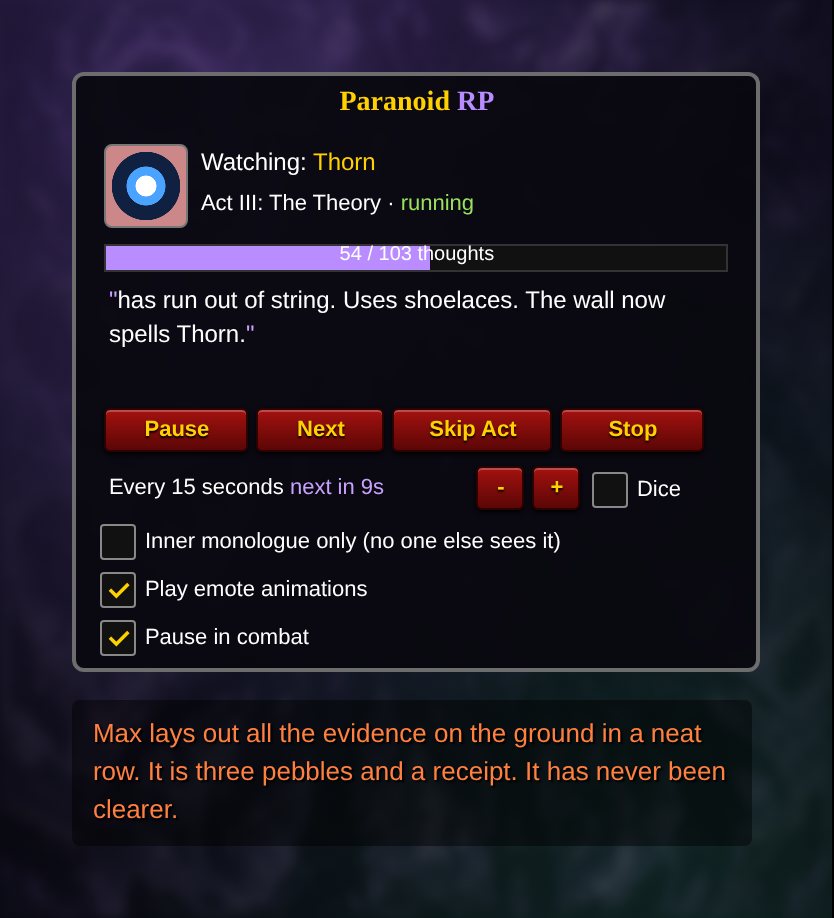
Paranoid RP panel watching a target in Act III, The Theory
Panel preview, recreated from the addon's code. In game it uses your own character, target and guild.
Etiquette of the Coil: the trash talk is light and about gear and fire-standing, never the person, but try it on willing guildmates first, and stop if anyone is not enjoying it.
WHAT IT DOES

Act I

The Glance

It starts small. A look. A second look. Was that a smirk? Your character begins to notice things nobody else would.

Acts II and III

The Evidence and the Theory

Notes are taken. Timelines are drawn. The conspiracy board goes up, with red string, and the target's class, race, guild and zone are all pinned to it.

Acts IV and V

The Confrontation and the Trash Talk

Finally your character says it out loud, and then says what they really think of the target's gear and fire-standing. Never about the person, always about the rotation.

The Panel

Timing, animations and quiet mode

5 to 60 seconds between thoughts, or random timing. Start at any act, skip ahead, turn the animations off, or use /para quiet to keep the thoughts as an inner monologue only you can see. It pauses in combat.

COMMANDS
CommandWhat it does
/paraShow or hide the Paranoid RP panel
/para startStart watching your target (/para start 3 begins at Act III)
/para pause · next · skip · stopPause, say the next thought now, jump to the next act, or stop
/para interval 15Seconds between thoughts (5 to 60)
/para diceRandom timing between thoughts
/para quietInner monologue: thoughts shown only to you
/para animTurn emote animations on or off
THE RITE OF INSTALLATION

How to install Paranoid RP

  1. Download ParanoidRP.zip (12 KB).
  2. Extract the zip. Move the ParanoidRP folder into World of Warcraft\_retail_\Interface\AddOns\. On Windows this is usually C:\Program Files (x86)\World of Warcraft\_retail_\Interface\AddOns.
  3. Make sure the folder sits directly inside AddOns, not in a folder inside a folder.
  4. Restart World of Warcraft or type /reload.
  5. Target a willing guildmate and type /para start.
Steam Deck faithful: the AddOns folder is inside the Proton/Wine prefix where Battle.net is installed, under the same World of Warcraft/_retail_/Interface/AddOns path. Switch to Desktop Mode and move the folder there.
QUESTIONS
Can I keep the thoughts to myself?

Yes. /para quiet shows the thoughts only in your own chat window, as an inner monologue.

Can I skip to the confrontation?

Yes. /para start 4 begins at Act IV, and /para skip jumps to the next act.

OTHER RELICS OF THE COIL

/xrp

Xal'Reth RP

10,100 rites of Xal'Reth, performed as emotes.

/vrp

Vyrenna RP

The Teachings of the Sacred Triangle, read aloud as emotes, in green and gold.

/story

StoryCaster

Paste your own roleplay and perform it as emotes with animations.

/nh

No Hablo

One red button that hides Spanish text chat from your own screen.

/edge

Edgelord Pro

Edgy PC-mastery gamer emotes that get more annoying over time.

/dq

Drama Queen Pro

Deadpan fake personal drama every five minutes (use at your own risk).

/fs

Full Support

Automatic supportive replies to Drama Queen posts.

All addons Ask in our Discord