Write your own roleplay and perform it: /emotes on a timer, with real character animations.
Free WoW Addon · Available Now · 610 KB
Version 2.0.1Retail · MidnightFree
Paste a story, a speech or a whole scene, alone or as a duet, and StoryCaster turns it into /emote lines that play out on a timer while your character acts it out: a bow, a wave, a laugh, a kneel. Your words, your timing, no typing in the middle of the moment. Eighteen animated emote buttons on the panel cover everything in between.
1,544pirate, love, war, peace and after-dark lines
40dungeon phrases
/storyslash command
SCREENSHOTS
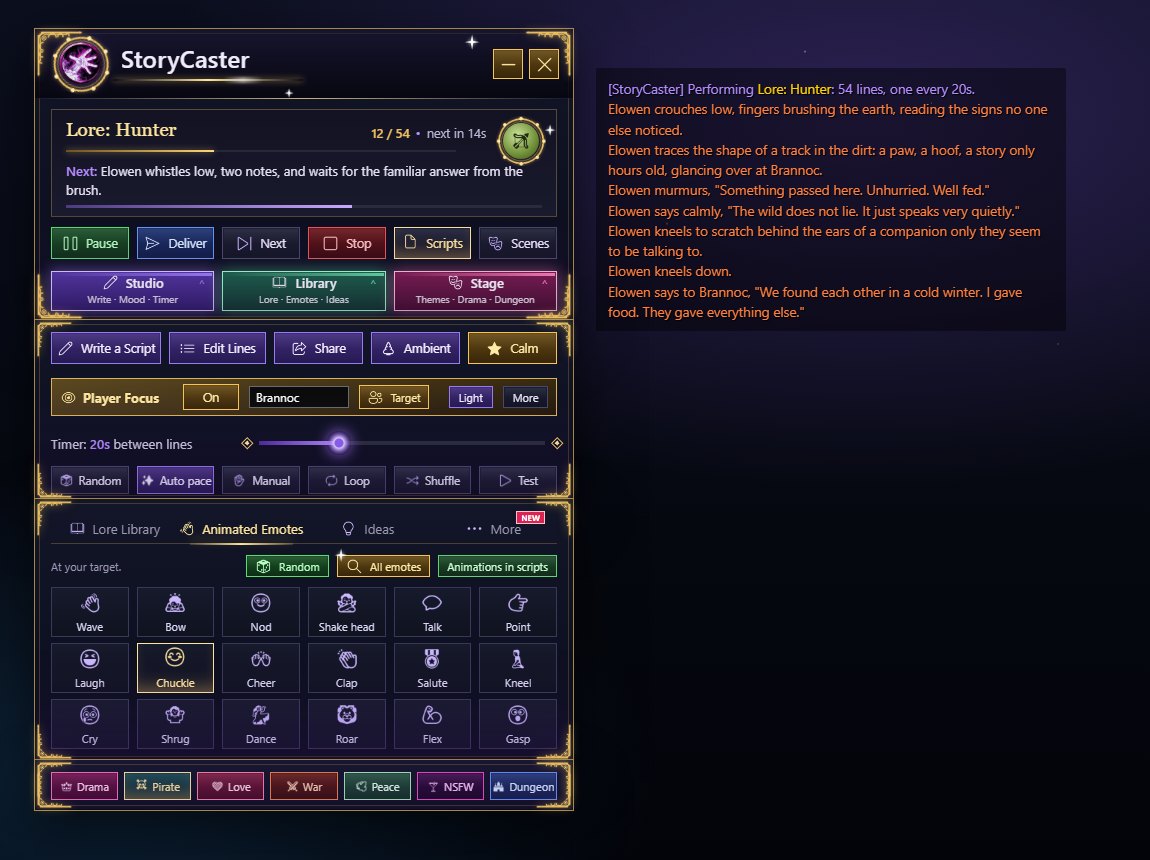
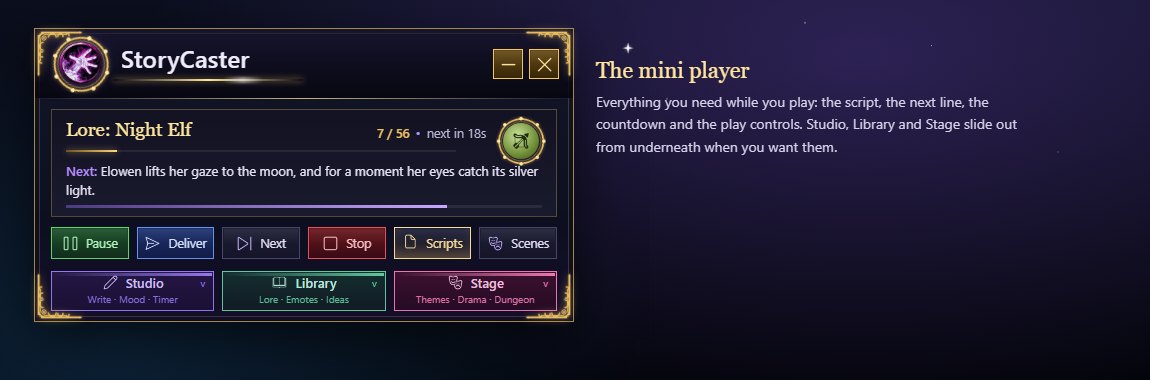
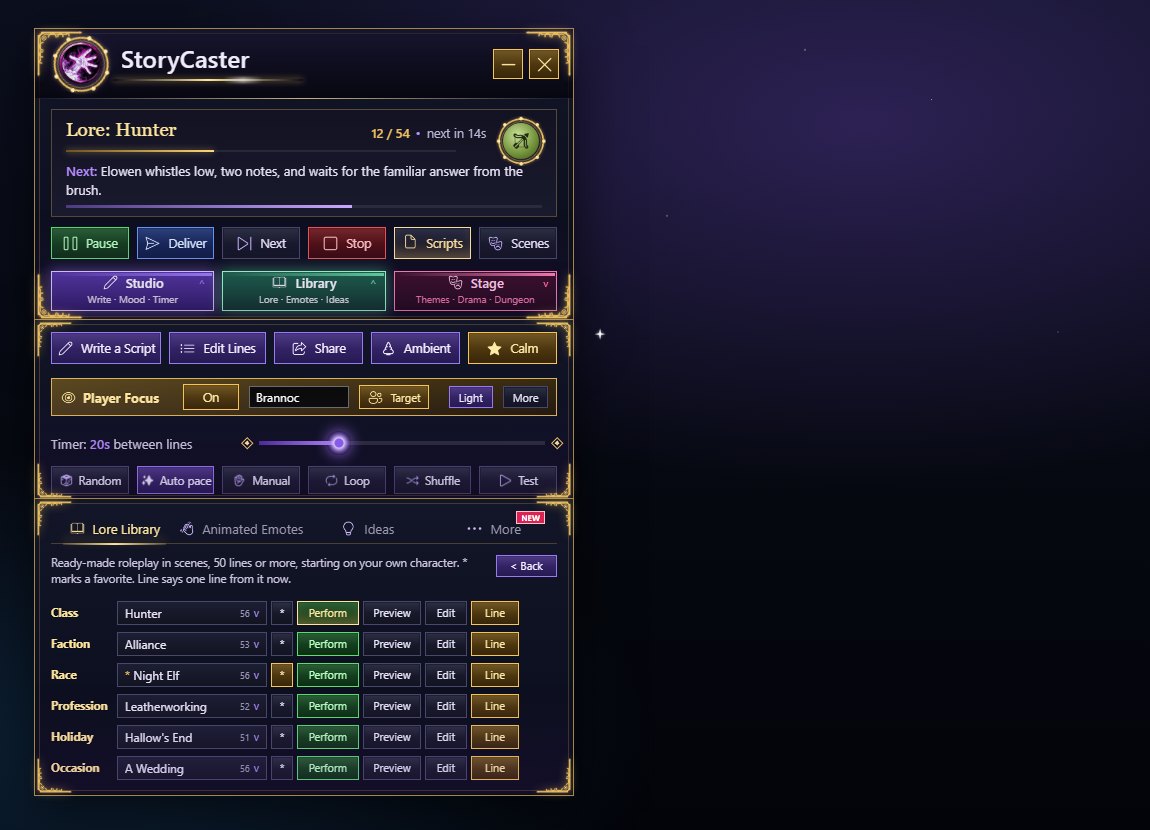
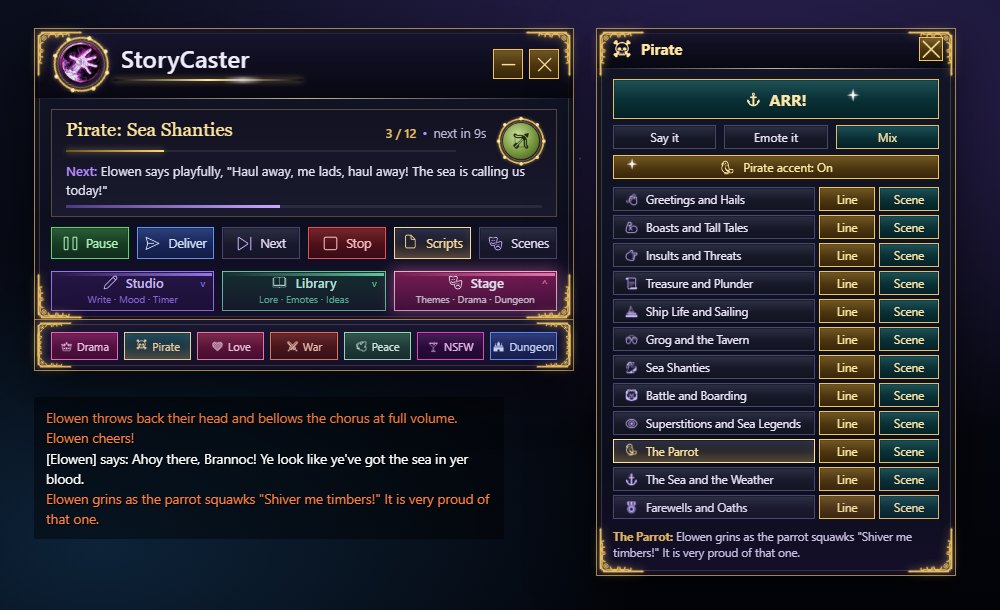
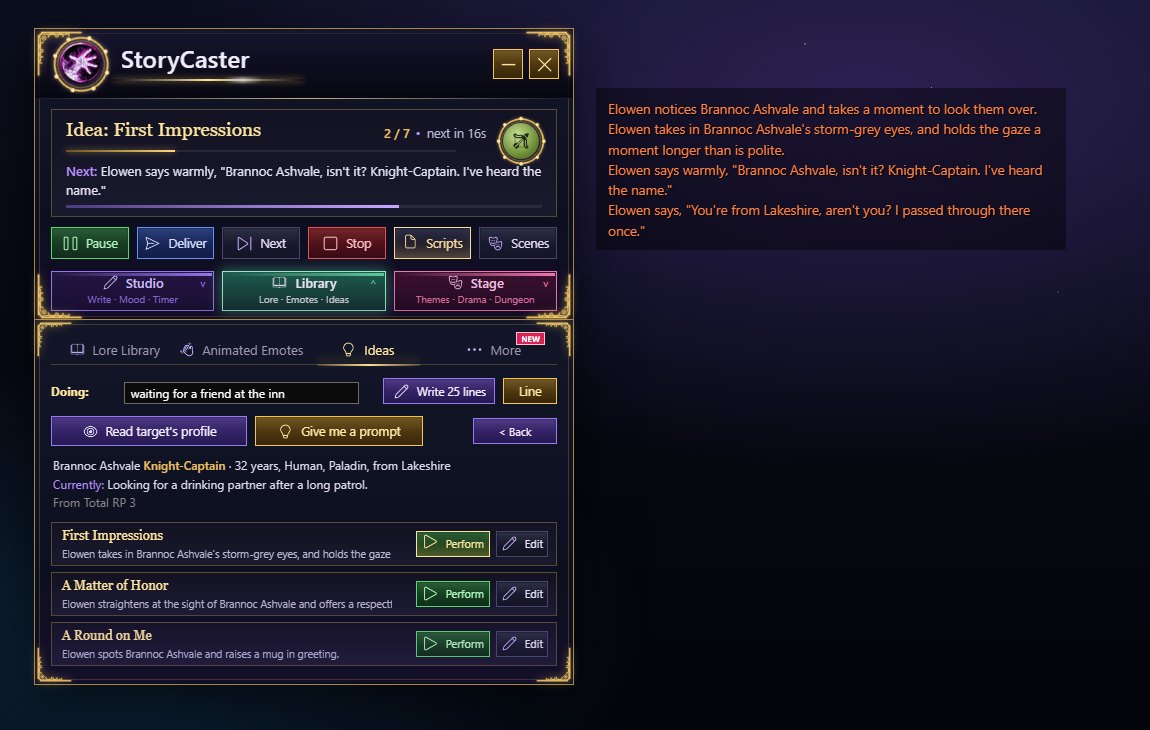
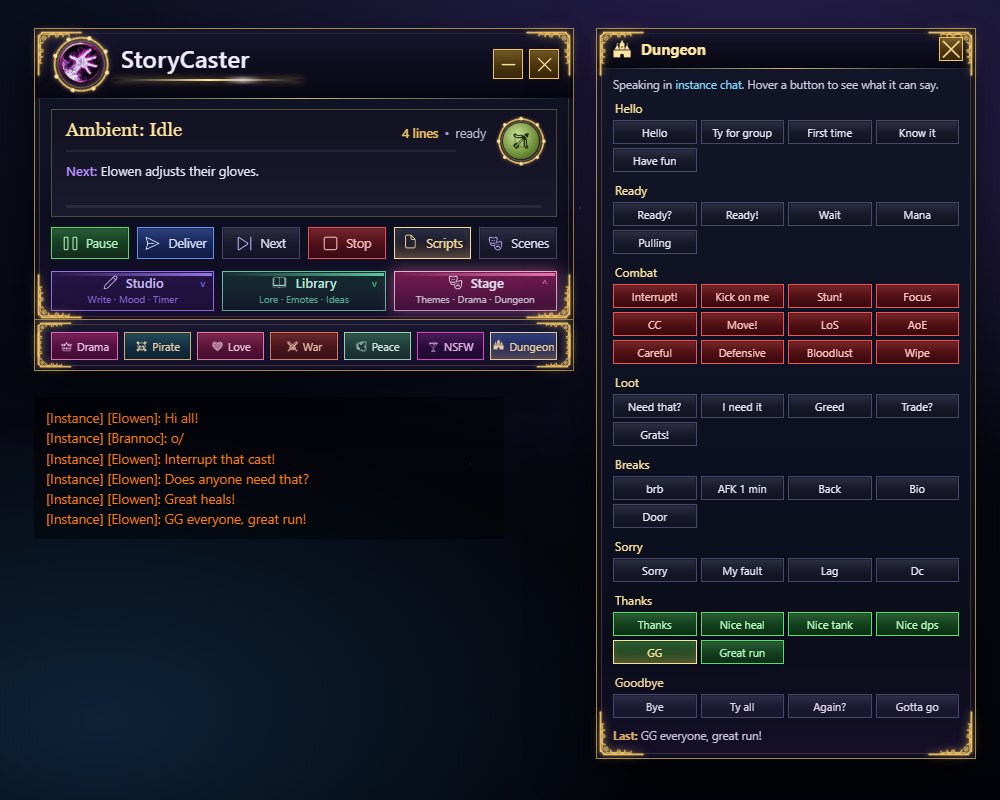
The full console: the player with Studio, Library and Stage stacked underneath, and the emotes it posts (Player Focus weaves in Brannoc).The mini player: everything you need while you play. Studio, Library and Stage slide out from underneath.The Lore Library: 69 ready-made scripts of 50+ lines, starting on your own character.Pirate: 701 lines in twelve categories, scenes, and a pirate accent for everything you say.Ideas: type what you're doing for 25 lines about it, or get openers written from your target's Total RP 3 or MyRolePlay profile.Dungeon: forty one-click phrases for your group, in instance, raid or party chat.
Previews recreated from the addon's own textures and code. In game they use your own character, target and group.
WHAT IT DOES
What Are You Doing?
25 lines for any status
Type what your character is doing into the Doing box (in Studio, under Player Focus, and at the top of the Ideas tab) (fishing by the lake, waiting for a friend at the inn, read a book by the fire) and press Write 25 lines. StoryCaster recognizes 24 everyday activities, each with 25 lines of its own: fishing, cooking, reading, the tavern, waiting, standing guard, training, crafting, praying, resting, traveling, trading, healing, studying magic, writing letters, music, dancing, gathering herbs, hunting, celebrating, grieving, being lost, working a shift and caring for a pet. Anything else gets 25 lines written around your own words. Perform plays them on your timer, Line says one now, Edit makes them yours.
Pirate, Love, War and Peace
Four themed libraries, one click each
The theme bar under the header holds Drama, Pirate, Love, War, Peace and Dungeon. Each theme slides out its own panel of categories: Pirate has 701 lines in twelve (hails, boasts, insults, treasure, ship life, grog, original shanties, battle, superstitions, the parrot, the sea, farewells) and a pirate accent that turns everything you say into pirate speak; Love (flirting, compliments, courtship, longing, heartbreak, devotion), War (battle cries, the eve of battle, the fray, taunts, victory, the aftermath) and Peace (greetings, stillness, wisdom, mending quarrels, blessings, rest and nature) have over 200 lines each. Every category has Line (one now) and Scene (a dozen on your timer); a big button picks from anywhere; Say, Emote or Mix; one line every 15 seconds at most.
After Dark (18+)
Nightlife, cheeky but never explicit
The NSFW button opens After Dark: 218 adult-themed lines of nightlife comedy in seven categories: Drinking, Go-Go Dancing, Cheeky Flirting, Bar Crawl and Nightlife, Dares and Games, Bar Brawls and The Morning After. It asks once that you're 18 or older before it opens. The lines are suggestive at most and never explicit; anything you post in public still has to follow the game's chat rules.
Dungeon
Say the right thing, fast
The Dungeon panel is forty one-click phrases for your group, in eight groups: hello, ready, combat (interrupt!, stun!, focus, CC, move!, line of sight, AoE, defensives, bloodlust, wipe), loot (need that?, greed, trade?, grats!), breaks (brb, AFK, back, bio), sorry, thanks (GG, great run, nice heal, nice tank) and goodbye. Each button picks one of a few wordings, never the same twice in a row, and speaks in instance, raid or party chat, whichever your group is.
Player Focus and Ideas
Bring other players into the story
Player Focus sits right under the script: turn it on, pick your target or type a name, and whatever you perform finds room for them now and then: says to Brannoc, "..." here, ..., glancing over at Brannoc. there. Light or More, never two lines in a row, never when they're already named. The Ideas tab reads your target's Total RP 3 or MyRolePlay profile (name, title, race, home, eyes, what they're up to, their About text) and writes three openers made from it, or gives you random scene prompts. It only reads what your RP addon already knows; nothing is sent anywhere.
Also new: a gold-framed look with icons on every button, sparkles and glows on the gold accents, your RP name for {name} and {title}, Backup and Restore for all your scripts, duets that wait until everyone has joined, and a minimap button.
Drama
Drama Queen, Paranoid and Brain Rot, built in
The pink Drama button slides out three pages. Drama Queen: deadpan personal drama every few minutes (you pick 1 to 60), in guild chat and/or publicly as an emote and a /say line, with multi-part sagas, one voice per guild and the Queen Detector, which also finds Drama Queen Pro users. It starts switched off; please read the use-at-your-own-risk disclaimer first. Paranoid: target someone and perform five acts of growing suspicion, from a nervous glance to light trash talk, on the panel's own timer, or as a private inner monologue. Brain Rot: one click, one of over a thousand random lines, said or emoted, recharging for 15 seconds.
Choices, Reactions and Your Voice
Scripts that answer back
A line like ?? Fight it | Run away > The Escape stops the script and shows the options as buttons; each jumps to its scene. /goto The Escape jumps, /end ends, and /mood sad changes the mood mid-script, with a fitting animation now and then. Under More: Reactions answer emotes and words aimed at you (off until you turn them on, once a minute per person), Send a script offers your script straight to a friend's StoryCaster, and My voice keeps this character's title, catchphrase and own words for each mood, so {title} and {catchphrase} fill themselves in.
The Lore Library
Ready-made roleplay for every character
Not sure what to say? Open the glowing Lore Library tab at the bottom of the panel (or type /story lore) and pick from six dropdowns: Class (all 13), Faction (Alliance, Horde or unaligned), Race (all 25), Profession (all 15, from Alchemy to First Aid), Holiday (5, starting on the one in season) and Occasion: a wedding, a funeral, departing for battle, the birth of a child, the loss of a friend and three romances, written to fit any race and class. Each one starts on your own character; star your favorites, and Line says a single line from any of them. Every choice is an original script of 50 lines or more, in scenes, with animations and a few lines said aloud: a paladin's vigil, a death knight remembering being alive, a goblin's first deal, a dracthyr's first sunrise.
Perform saves it to your scripts and plays it on your timer, Preview shows it in your own chat only, and Edit opens a copy in Write a Script to make it yours. /story lore blood elf performs one straight away. Target someone first and lines that mention them use their name.
Moods and Every Emote
Same words, a different feeling
Put <mood> after a verb in any script, like says <mood>, "Stay a while.", then choose a feeling from the Mood button: Happy, Sad, Angry, Scared, Calm, Excited, Nervous, Tired, Playful or Serious. Each line takes a fitting phrase as it is posted (says through gritted teeth, says with a warm smile), picked fresh every time, and changing the mood mid-scene changes the very next line. None leaves it out. Every Lore Library script already has it.
All emotes opens every emote in the game (read from the game's own list) with a search box, one click each. Random plays a random one and then rests for 15 seconds, so it can never be spammed.
Duets and Group Scenes
Everyone plays their part
Start a line with a character's name, like [Brannoc] draws his blade., and that line belongs to them. Press Play and your StoryCaster invites the others (through your party or raid, or a whisper), then runs the scene: each player's own StoryCaster performs their lines on cue, with their own animations. Everyone needs StoryCaster and presses Join.
Deliver, Scenes and Sharing
Live RP, on cue
/s, /y, /p, /ra and /g lines are spoken in that chat; /say and /yell wait for the Deliver button or key, because the game only allows them from a key press. Manual mode makes every line wait for Deliver, like a teleprompter. ## Act Two starts a scene you can jump to. Share copies a script as text for friends, and Edit Lines lets you start from, test, move or delete any line.
Placeholders and Pacing
Never the same twice
{target}, {name}, {class}, {race}, {zone}, {subzone} and {time} fill themselves in, and {smiles|grins|smirks} picks one at random. Auto pace gives longer lines more time. Ambient runs a quiet loop of small idle actions for standing RP, and five starter scripts show what is possible. Compact mode and key bindings (Key Bindings > AddOns > StoryCaster) keep it out of your way.
Never spam: on its own StoryCaster never posts faster than one line every 15 seconds, or more than 4 lines a minute, whatever the timer or a /pause says. Only your own Deliver presses go faster.
Write a Script
Paste it, it becomes emotes
Paste or type your roleplay. StoryCaster cuts it into emotes one per sentence, one per line, or packed as full as chat allows, splits anything too long for the 255-character limit, and removes your name, /e and numbering for you. A live count and a private Preview in Chat show exactly what will be said.
Macro-style lines work too: /pause 4 on its own line waits four seconds before the next emote, /bow or /wave plays the animation, and /s or /y lines become says, "..." emotes. A slash command is never posted as words.
Animations
Act it out
Write [bow], [wave] or [kneel] anywhere in a line and your character plays it as the line is posted; a line with only [nod] just plays the animation. With Auto animate on, lines that say bows, waves, laughs, cries or cheers animate on their own.
The Panel
Play, pause, timing
Play, Pause, Next and Stop, your saved scripts, a 15 to 60 second timer, random timing, Loop, Shuffle and a Test mode that shows the emotes only to you. It holds during combat and boss fights and picks up where it stopped.
Eighteen Buttons
Emotes on demand
Wave, Bow, Nod, Shake head, Talk, Point, Laugh, Chuckle, Cheer, Clap, Salute, Kneel, Cry, Shrug, Dance, Roar, Flex and Gasp, one click each, aimed at your target. {target} in a script becomes your target's name.
EVERY FEATURE, EXPLAINED
Every feature, explained
StoryCaster is a free roleplay addon for World of Warcraft: Midnight and World of Warcraft: Forever. You write (or pick) roleplay, and StoryCaster performs it for you: emotes on a timer or one key press at a time, real character animations, spoken lines, scenes, duets and much more. It is completely standalone: no guild branding, no lore of its own, just tools for your own stories.
Open it with /story (or /storycaster), the minimap button, or the AddOn Compartment (the addon list button by the minimap).
1. The panel
The mini player and its three areas. The panel is a compact mini player: the header, the script card and the play controls, with three toggles along its bottom edge, each in its own color with a caption: Studio in violet (Write · Mood · Timer), Library in emerald (Lore · Emotes · Ideas) and Stage in rose (Themes · Drama · Dungeon). An open area's toggle fills with its color and glows. Each toggle slides an area down from underneath the player:
Studio: Write a Script, Edit Lines, Share, Ambient, Mood, Player Focus, the timer slider and its six switches.
Library: the Lore Library, Animated Emotes, Ideas and More tabs.
Stage: the theme bar (Drama, Pirate, Love, War, Peace, After Dark, Dungeon).
Each area drops out from behind the one above with a smooth slide and fade, lands with a flash of gold along its top edge, and tucks back up when closed. Open all three and they stack under the player into one console. Open none and it's just the player. Your choice is remembered, opening the Lore Library from anywhere opens the Library area, and dragging any area moves the whole thing. Commands: /story studio, /story library, /story stage, /story mini (just the player) and /story full (everything).
The panel is deep navy glass inside a gold frame with flourishes at every corner.
The header
Your StoryCaster logo in a slowly turning gold ring, with a violet glow behind it that brightens and dims.
The name "StoryCaster" over a gold line with light sweeping along it.
A fold button (compact mode) and a close button.
The theme bar, in the Stage area: Drama, Pirate, Love, War, Peace, NSFW (After Dark), Dungeon. Each slides out its own panel beside the main one (only one at a time).
The script card
The chosen script's title in gold, a gold progress line under it, and your class crest beside it (the class of a Lore class script, otherwise your own).
Progress and timing: "53 / 56 • next in 53s", plus states such as paused, holding (combat), press Deliver, choose your path, or who a duet is still waiting for.
Next: the line coming up, exactly as it will read.
A thin countdown bar that drains until the next line.
Player Focus: a strip right under the card (see section 8).
Play controls: Play/Pause, Deliver, Next, Stop, Scripts, Scenes.
Writing controls: Write a Script, Edit Lines, Share, Ambient, Mood.
Timing
A slider from 15 to 60 seconds between lines, between gold diamond end caps, with a glowing knob. The mouse wheel moves it one second at a time.
Six switches: Random, Auto pace, Manual, Loop, Shuffle, Test.
Tabs: Lore Library, Animated Emotes, Ideas, More. A gold underline glides to the open tab. Tabs you haven't opened yet wear a NEW badge, and the Lore Library tab glows gold to catch your eye.
Effects
Gold accents glow, and small gold sparkles twinkle now and then along the frame, the crest, the title line and the slider's diamonds.
Pointing at a button lights it gold and lifts its icon slightly.
Clicking a button flashes it and sends a little burst of sparkles flying.
Each new line flashes the script card.
The panel fades and settles in when it opens.
Sparkles can be turned off under More.
Compact mode (the fold button) hides the script card, leaving just the header, play controls and toggles.
2. Writing scripts
Write a Script opens the writing window. Paste or type your roleplay, written the way emotes read: walks to the door. becomes YourName walks to the door.
Three ways to cut your text
One per sentence: each sentence becomes its own emote. Quoted speech stays whole, so says, "The beast is never gone. We learn to walk beside it." is one line.
One per line: each line you typed becomes one emote.
Fill each emote: sentences are packed together up to the chat limit, a paragraph at a time.
Anything too long for chat's 255-character limit is split at a sentence end or space. Your own name, "/e" and numbering are removed automatically. A live count shows lines, animations, chat lines, pauses, duet partners, splits and skipped lines, and Preview in Chat shows every line in your own chat window only.
What a script can contain
Pacing and animation
/pause 4 (or /wait, /delay, /sleep) on its own line waits 4 seconds before the next line.
[bow], [wave], [kneel] and other tags anywhere in a line play that animation as the line is posted. A line with only a tag just plays the animation. /bow on its own line does the same.
Auto animate: lines that say bows, waves, laughs, nods, kneels, cries, cheers and so on animate on their own, even without a tag.
Speaking
/s, /y, /p, /ra, /g, /i lines are said in that chat. /say and /yell outside instances wait for Deliver (a game rule: they need a key press). Party, raid, guild or instance lines become a "says" emote when you aren't in one.
Structure
## Act Two starts a scene you can jump to with Scenes.
[Name] at the start of a line gives it to a duet partner (section 13).
Moods and branching
/mood sad changes the panel's mood mid-script (section 6).
?? Fight it | Run away > The Escape is a choose-your-path stop. The options appear as buttons on the panel, and each jumps to the scene it names (or the scene with its own name).
/goto The Escape jumps to a scene. /end ends the script. A runaway loop of jumps stops itself.
Placeholders (filled in as each line is posted)
{target}: your target's name (or your focused player when you have no target).
{focus}: the player in Player Focus.
{name}: you (your Total RP 3 or MyRolePlay name if you have one).
{title}, {catchphrase}: from My Voice, or your RP title.
{class}, {race}: yours.
{zone}, {subzone}: where you are.
{time}: morning, afternoon, evening or night.
{smiles|grins|smirks}: one picked at random.
{sender}: in a reaction, whoever started it.
<mood>: a phrase for the chosen mood.
Load brings a saved script back for editing; Delete removes it. A script a friend shared can be pasted in, and it names itself.
3. Performing
Play performs the chosen script on the timer; press again to Pause.
Deliver posts the next line right now, and is needed for /say and /yell lines. It can be bound to a key.
Next skips ahead. Stop ends the performance.
Scripts lists your saved scripts. Click to choose, right-click to start at once.
Scenes jumps to any scene.
Edit Lines shows every line as a row: start from it, test it, move it up or down, or delete it.
Share copies the script as text for a friend or Discord.
Timing switches
Random: random gaps (15 to 25 seconds by default; /story dice 15 40 changes the range).
Auto pace: longer lines get more time.
Manual: no timer; every line waits for Deliver, like a teleprompter.
Loop: start again at the end. Shuffle: random order (never in duets).
Test: lines print only to you, so you can rehearse.
Never spam. On its own, StoryCaster never posts faster than one line every 15 seconds, or more than 4 lines in any minute, whatever the timer or a /pause says. Only your own Deliver presses and button clicks go faster. Reactions, Drama and Player Focus all share the same guard.
Holds in combat. Scripts hold during combat and during boss-fight chat lockdown, then pick up where they stopped.
Ambient runs a quiet loop of small idle actions (adjusting gloves, glancing around, humming) in random order every 25 to 70 seconds, for standing RP. Edit "Ambient: Idle" to make it yours.
Starter scripts (a greeting, a toast, a duel challenge, a farewell and a duet) show what's possible.
Key bindings (Key Bindings > AddOns > StoryCaster): show the panel, play/pause, Deliver, stop, and six animations.
4. Animated Emotes
The Animated Emotes tab has eighteen tiles, each with a picture over its name: Wave, Bow, Nod, Shake head, Talk, Point, Laugh, Chuckle, Cheer, Clap, Salute, Kneel, Cry, Shrug, Dance, Roar, Flex and Gasp. One click plays it at your target.
All emotes opens every emote in the game, read from the game's own list, with a search box and pages. Click any one to play it.
Random plays a random emote from the whole list, then rests 15 seconds (the button counts down).
Animations in scripts turns the [tag] animations in scripts on or off.
5. The Lore Library
Ready-made roleplay: 69 original scripts, every one 50 lines or more, in scenes, with animations and spoken lines. It is picked from six dropdowns, each starting on your own character:
Class: all 13.
Faction: Alliance, Horde, or Unaligned.
Race: all 25, Alliance, Horde and shared.
Profession: all 15. Alchemy, Blacksmithing, Enchanting, Engineering, Herbalism, Inscription, Jewelcrafting, Leatherworking, Mining, Skinning, Tailoring, Cooking, Fishing, Archaeology, First Aid.
Holiday: Hallow's End, Winter Veil, Brewfest, Lunar Festival, Darkmoon Faire. It starts on the one in season.
Occasion: a wedding, a funeral, departing for battle, the birth of a child, the loss of a friend, and three romances (first meeting, a quiet evening, the confession). These are written to fit any race and class through {race}, {class} and {target}.
Each row has these buttons:
dropdown: favorites are listed first.
\*: mark a favorite.
Perform: saves it as "Lore: …" and plays it on your timer.
Preview: in your own chat only.
Edit: opens a copy in Write a Script under your own name.
Line: says one random line from it now, then rests 15 seconds.
Every spoken line in the library carries <mood>, so the Mood button colors all of it.
6. Mood
The Mood button opens ten moods (Happy, Sad, Angry, Scared, Calm, Excited, Nervous, Tired, Playful, Serious) plus None.
Every <mood> in a line becomes a fitting phrase as it is posted. With Angry, says <mood>, "Hello." becomes says through gritted teeth, "Hello." Each mood has eight phrases picked at random.
Changing the mood mid-performance affects the very next line. None removes the tag cleanly.
/mood sad in a script changes it from inside the story.
Mood animations (on by default, under More): now and then a line with <mood> also plays a fitting animation. Angry roars, Sad cries, Happy laughs. At most one every 45 seconds.
My Voice can give any mood your own words instead of the built-in ones.
7. Ideas: RP from other players' profiles
The Ideas tab has two buttons.
Read target's profile reads your target's Total RP 3 or MyRolePlay / XRP profile: name, title, race, class, age, eye color, height, home, birthplace, motto and other extra fields, what they're "currently" doing, OOC info and their About text.
It shows a short summary, and three openers written from it:
First Impressions, built from their actual details. For example, noticing their storm-grey eyes, asking about Lakeshire, quoting their motto, addressing them by title.
Two themed openers that fit what the profile is about. StoryCaster spots words in their profile for a knight, scholar, sailor, drinker, shadowy type, healer, noble, soldier, merchant, bard, wilds, dark arts or faith.
Small talk, when nothing stands out.
Lines that would need a detail the profile doesn't have are left out, so there are no blanks. Each opener can be Performed (on your timer, not saved) or Edited into a script of your own.
Without an RP addon, it uses what the game shows: name, race, class and guild. It only reads what your RP addon already knows; nothing is sent anywhere.
Give me a prompt offers three of 24 random scene ideas, each a short starter script with {target} and <mood> ready. Examples: a sealed letter appears on the table; a rival needs your help; a wanted poster looks just like {target}; a crate twitches.
7b. What are you doing?
A Doing box sits in the Studio area, right under Player Focus (with Write 25, Line and Play), and again at the top of the Ideas tab. Type your character's status, what they're doing, where and with whom, and press Write 25 lines (or Enter).
24 everyday activities have 25 lines each, written for them: Fishing, Cooking, Reading, Drinking at the Tavern, Waiting for Someone, Standing Guard, Training and Sparring, Crafting at the Forge, Praying and Meditating, Resting and Relaxing, Traveling and Exploring, Shopping and Trading, Healing and Tending Wounds, Studying Magic, Writing Letters, Playing Music, Dancing, Gathering Herbs, Hunting and Tracking, Celebrating, Grieving, Lost, Working a Shift and Caring for a Pet. StoryCaster picks the one your words fit best.
Anything else gets 25 lines written around your own words. It tidies what you typed so it reads naturally: I'm reading a book becomes reading a book, read a book by the fire becomes reading a book by the fire, and at the docks becomes spending time at the docks.
The lines appear as a card: Perform plays all 25 on your timer, Edit opens them in Write a Script, and Line says one random line now. Line never repeats until all 25 are used and rests 15 seconds after each.
Your last status is remembered. /story status fishing by the lake does it from chat; /story status alone says one line.
8. Player Focus
A prominent gold strip under the script card. Turn it On, then press Target (or type a name). Leave the name empty to follow whoever you target.
While it's on, everything you perform weaves that player in, a little at a time:
now and then a "says" line becomes says to Brannoc, "…"
or an action gets a short aside: …, glancing over at Brannoc., …, catching Brannoc's eye.
Two levels: Light (a mention every 5–7 lines) or More (every 3–4).
It never mentions them in two lines in a row, never when they're already named in the line, and never in /say, party or guild lines.
{target} uses them when you have nobody targeted, and {focus} names them directly.
9. Drama (Drama Queen Pro, Paranoid RP and Brain Rot, built in)
The Drama slide-out has three pages.
Drama Queen
Deadpan, real-sounding personal drama: 5,960 lines plus multi-part sagas, posted every 1–60 minutes.
Two switches: Cause drama in guild (guild chat) and Cause drama publicly (an acted emote plus a /say line; /say is automatic in instances and waits for Deliver outside them).
One voice per guild: only one copy speaks for the guild. Drama Queen Pro users count, and Main voice lets you claim it.
The Queen Detector finds other Drama Queens in your guild and group, and optionally on a hidden network channel.
Drama now, Say it, ±1 minute, and the last line.
It starts off, with a use-at-your-own-risk warning.
Paranoid
Target someone and press Start: five acts of growing suspicion, from a nervous glance to light trash talk, about 100 thoughts filled with their name, class, race, guild and zone.
It runs on the panel's timer, so Pause, Next, Skip act and Stop work.
Inner monologue keeps it private, so only you see the thoughts.
Brain Rot
One big button: one of 1,267 lines of brain rot aimed at your target, said, emoted with an animation, or a mix. It recharges for 15 seconds.
10. Pirate, Love, War and Peace
Each theme slides out its own panel with:
a big button (ARR!, Swoon, For Glory!, Be Still) for a random line from anywhere in the theme
Say it / Emote it / Mix: spoken lines are said in /say, or become "says, …" emotes
a row per category with Line (one now) and Scene (a dozen of them as a scene on your timer)
At most one line every 15 seconds. Lines use {target}, <mood> and animations, and Player Focus works with them.
Theme
Lines
Categories
Pirate
701
Greetings and Hails, Boasts and Tall Tales, Insults and Threats, Treasure and Plunder, Ship Life and Sailing, Grog and the Tavern, Sea Shanties (original verses), Battle and Boarding, Superstitions and Sea Legends, The Parrot, The Sea and the Weather, Farewells and Oaths
Battle Cries, Before the Battle, In the Fray, Taunts, Victory, The Aftermath
Peace
205
Peaceful Greetings, Stillness, Wisdom, Mending Quarrels, Blessings, Rest and Nature
Pirate accent (in the Pirate panel) turns everything you say into pirate speak, in every script, not only pirate lines:
you → ye, my → me, hello → ahoy, yes → aye, friend → matey, is → be, sailing → sailin'
now and then a starting "Arr,"
it changes only the words inside quotes (and whole chat lines)
10b. After Dark (18+)
The NSFW button opens After Dark: 218 adult-themed lines of nightlife comedy, working just like the other themes (a big Cheers! button, Say/Emote/Mix, Line and Scene per category):
Drinking (34), Go-Go Dancing (33), Cheeky Flirting (31), Bar Crawl and Nightlife (31), Dares and Games (29), Bar Brawls (29), The Morning After (31).
It asks once that you're 18 or older before it opens. The lines are suggestive at most and never explicit; anything you post in public still has to follow the game's chat rules.
11. Dungeon
Forty one-click phrases for your group, in eight groups:
Hello: hello, ty for group, first time, I know it, have fun.
Ready: ready?, ready!, wait, mana, pulling.
Combat: interrupt!, kick on me, stun!, focus, CC, move!, line of sight, AoE, careful, defensive, bloodlust, wipe.
Loot: need that?, I need it, greed, trade?, grats!
Each button has two to four wordings, picked at random and never the same twice in a row (hover to see them all). It speaks in instance, raid or party chat, whichever your group is, and tells you when you're not in a group. A 1.5-second guard stops double clicks.
12. More
The More tab holds:
Reactions (off until you turn them on): your character answers emotes aimed at you and words said near you. Wave at me → waves back at Brannoc with a warm smile. You edit the rules as simple lines (waves = waves back at {sender}. [wave], "hello" = nods at {sender}.). They answer each person at most once a minute, never faster than one line every 15 seconds, and never yourself.
Send a script: offers the chosen script straight to a friend's StoryCaster. Type their name or leave it empty for your target. They're asked first, then it arrives in pieces over a hidden addon channel and is saved to their scripts.
My voice, per character: a title and catchphrase for {title} and {catchphrase}, and your own words for any mood.
Mood animations: on or off.
Backup / Restore: every script as one block of text to keep in a file or Discord. Paste one back to restore. Scripts you already have are kept; copies get "(restored)".
RP name: uses your Total RP 3 or MyRolePlay name and title for {name} and {title}.
Sparkles: on or off.
Minimap button: show or hide it.
13. Duets and group scenes
Start a line with a character's name, [Brannoc] draws his blade., and that line belongs to them.
Press Play: your StoryCaster invites the others through your party, raid or instance group (or a whisper when you're not grouped), sending them the script over a hidden addon channel.
Ready-check: the scene waits until everyone has joined (or 45 seconds). The header shows who you're still waiting for, and a "No thanks" tells you at once.
Each player's own StoryCaster performs their lines on cue, with their own animations. /say lines wait for that player's Deliver.
/story interval 20 · dice 15 25 · pace · manual · loop · shuffle · test
Timing and modes
/story ambient · compact · reset
Idle loop, fold the panel, move it back
/story anim bow · anims · emotes · random
Animations, every emote, a random emote
/story mood angry · mood none
Set the mood
/story lore · lore blood elf
The Lore Library, or perform a set straight away
/story focus Name · focus target · focus off · focus light · focus more
Player Focus
/story profile · prompt
Ideas from your target's RP profile, random prompts
/story drama · drama on · drama now · drama say · drama 5
Drama
/story paranoid · rot
Paranoid about your target, a line of brain rot
/story pirate · pirate accent
Pirate panel, pirate accent
/story reactions · send Name · voice · backup
Reactions, send a script, My Voice, backup
/story duet · minimap · sparkles
Auto-join duets, minimap button, sparkles
16. Good to know
Both games: separate downloads for Midnight and for WoW Forever, with the same features.
Saved per account: scripts, settings and the mood. Saved per character: My Voice.
Nothing leaves your game except what you choose to post, plus hidden addon messages to other StoryCaster users: duets, sending scripts, and the Drama Queen detector and guild voice.
Secret values: StoryCaster steps aside whenever Midnight hides a name or message (secret values), and never tries to read them.
Playing WoW Forever? Download StoryCaster for Forever instead and move its StoryCaster folder into _forever_\Interface\AddOns.
Extract the zip. Move the StoryCaster folder into World of Warcraft\_retail_\Interface\AddOns\. On Windows this is usually C:\Program Files (x86)\World of Warcraft\_retail_\Interface\AddOns.
Make sure the folder sits directly inside AddOns, not in a folder inside a folder.
Restart World of Warcraft or type /reload.
Type /story, press Write a Script, paste your scene and press Save and Perform.
Steam Deck faithful: the AddOns folder is inside the Proton/Wine prefix where Battle.net is installed, under the same World of Warcraft/_retail_/Interface/AddOns path. Switch to Desktop Mode and move the folder there.
QUESTIONS
Why does a second line appear when my character bows?
That is the game: every animated emote prints its own line ("YourName bows."). Turn animations off in scripts with /story animations if you only want your own words.
Can I rehearse without anyone seeing?
Yes. Test mode shows every emote only in your own chat window, and /story preview reads a whole script to you.
Can I edit a script later?
Yes. Type its name in the Write a Script window and press Load: every emote comes back one per line, with its [animation] tag.